Mostrando entradas con la etiqueta Windows. Mostrar todas las entradas

jueves, 13 de agosto de 2015

[Solved] Fix Windows Update Error Code 80072ee2

There are hundreds of errors available in your Microsoft Windows which can pop up at any time due to some random reason. But you can find their solutions too on the official Microsoft website. Developers have covered every possible error with their working solutions on the website. But it becomes a little difficult task to solve Windows update error as they pop up with some unusual notification. Even a tech geek finds it difficult to resolve. 
One such type of error is 80072ee2
Windows Update Error 80072ee2
You might face this error while trying to install new updates of Windows. Windows update error 80072ee2 pop up when your system start searching for new available updates. A notification saying "Windows could not search for new updates" with error code 80072EE2 would occur. Mostly this error is seen on Windows 7, Windows 8 or Windows 8.1 but on XP too you can face it.

So if you receive this error then just keep on reading this guide as we've covered all the possible solutions here. But first of all one must know the reason behind this error. Because then it can help you to find solutions of other Windows errors on your own .You might get some clue when they will pop up again in future. 

Why I Am Receiving Windows Update Error 80072ee2 ?

Some of the most common reasons we've mentioned below.
  • Windows Update servers might be experiencing an unusually high number of requests for updates.
  • You system might be unable to establish a connection to receive updates.

    How To Solve Error Code 80072ee2 ?

    We've mentioned all the steps below. Start from the first if it doesn't solve your problem then proceed for next.

    1. Close Windows Update
    This is the one of the most common and easy to implement method. Simply close your Windows update and wait for 10 to 15 minutes as this might lower down the high number of requests. Try after some time your bug might have gone now. (Note: - You can also wait for Windows Update to run at its next scheduled time.)

    2. Using Registry Editor
    • Navigate to Start menu.
    • Open Run type "regedit" and hit enter.
    • This will open registry editor. Now simply navigate to this path HKEY_LOCAL_MACHINE\SOFTWARE\Policies\Microsoft\Windows\WindowsUpdate.
    • Select Windows Update folder and delete the keys WUServer and WUStatusServer from the right hand side menu.
    Registry Editor
    Registry Editor
    • Now type "services.exe" in Run and press enter.
    • Look for ‘Windows Update‘ service at the bottom of the list. Right click on it and select restart.
    • Hope your problem has fixed now.
    3. Due To Malware Or Spyware
    If your system is affected from malwares or spywares then surely this is the reason for your error. Either your system has got them recently or they are residing from past. Now you've need to remove them. You can anti-malware tools such as Malwarebytes. Download and install it on your system. Perform a deep scan or quick scan in order to get rid from infections.

    4. Due To Third-party Firewall
    Microsoft Windows come with pre-installed firewall. It already include below mentioned website in the exceptions list. 

    http://*.update.microsoft.com
    https://*.update.microsoft.com
    http://download.windowsupdate.com

    If you're using any other firewall then you might need to add these websites in the exceptions list. You can contact your firewall's support center to know how to add them in the list.

    5. Due To Unregistered dll Files
    Due to random some dll files become unregistered. This can be one of the reason to your error. To solve this simply open your command prompt by typing cmd in the start menu and register these dll files oleaut32.dll,  jscript.dll,  vbscript.dll,  msxml.dll,  softpub.dll,  wintrust.dll,  initpki.dll, cryptdlg.dll. Use command regsvr32 {name of the dll} to register a dll.

    So these were some of the best picked solution to error code 80072ee2. Keep on trying them one by one. Hope one of them might fix your bug. If still you're not done with this issue then leave a comment below in the comment section.

    lunes, 10 de agosto de 2015

    [Solved] Fix Dropbox Sign In Error Code 403

    The reason behind writing this article is the mails I am receiving from past few days. Since past 15 days I have received around 10 mails regarding this drop box error code 403. So I decided to write a comprehensive guide on this issue. As I can notice that people are facing this error at two times firstly when they try to log in into dropbox and secondly on accessing their files stored in drop box. One of my reader sent me a mail saying "Whenever I try to access files stored in my drop box, it keep on showing me this 403 forbidden error code. I have not made any changes in my Dropbox setting still I am getting this error. Help me please!". 
    Dropbox Sign In Error Code 403
    Dropbox Sign In Error Code 403

    On researching I came to now that even if your login details are correct still you won't be able to view your files. This is only because of this error. It is seen that drop box has issue with most of the browsers but specially major amount of people are facing it on Google Chrome and Firefox.

    This is only because of dropbox's own cookie or browser's cookie problem. On deleting either drop box specific cookies or web browser's cookies you'll be able to resolve this issue. Due to cookie problem sometime Google chrome stops working also. This issue can happen on any operating system such as Windows XP or Vista, Windows 7 or 8, Windows 10 and even on Windows phone and Mac (iOS devices).

    Below I have mentioned all the steps to delete cookies. I have divided it into several steps as this 403 code error can happen on any browser.

    How To Delete Dropbox Cookies From Google Chrome

    Just follow the step by step process carefully mentioned below.
    • Open your Google Chrome browser and click on menu button (three horizontal lines) at the top right corner.
    • Now select "Settings" from the menu. 
    •  This will open up settings page simply scroll down to the end of the page and click on "show advanced settings".
    • Then click on "Content settings" from the privacy menu.
    • A new window will pop up. Click on "All cookies and site data".
    • Now search for dropbox in the Search box. It'll show all the cookies stored for the drop box. Select it and delete the item completely. Save you work by pressing Done.
    • That's it, you're done. Try to log in again and now you can view your files. If still error exists then delete all the cookies stored in your Chrome web browser.

      How To Delete Dropbox Cookies From Mozilla Firefox

      Follow each and every step and see the results.
      • Open your Mozilla Firefox web browser and click on menu button from the top right corner.
      • Now select "Options" from the menu. A new window with open with all the settings. 
      • Now select "Privacy tab" from the left side menu list. From there search for remove individual cookies and click on it.
      • Just search for Dropbox and delete all the cookies by clicking on remove selected. Try to sign in if it doesn't work then delete all the cookies.

        How To Delete Dropbox Cookies From Windows Phone (Internet Explorer)

        • Just click on the Internet explorer icon from the home screen.
        • Now tap on the ellipses (...) from the bottom right side.
        • Scroll down and select settings from the menu.
        • Scroll to the bottom of the page and search for Delete history. Simply click on it and tap confirm button. It'll take some time to clear all the cookies and history of your mobile browser.
        • Now you can sign in again into drop box.

        How To Delete Dropbox Cookies From Safari 

        If you're on Mac and using Safari browser then just follow these steps an get rid from dropbox sign in error 403.
        • Open your Safari browser and select "Safari" from the top left corner next to the apple logo.
        • Now select Clear history and website data from the menu. That's it. Simply log in and you won't face this error.
        Note: - Restart your web browser for the changes to take effect.

        So this was all about how to resolve dropbox login error 403. Hope using one of the above mentioned methods your problem is gone. Still if you've any doubt or query then feel free to leave a comment below in the comment section. 

        martes, 4 de agosto de 2015

        [Solved] Skype Login, Sign In Problems In Windows, MAC

        We all are aware about one of the top ranking text chat, voice and video call providing service Skype. From a small conversation between family members to a conference between multinational companies everything is on Skype. This is all because of the call quality Skype is providing to their users. But as we know that developers keep on updating these apps for minor or huge bug. It happens some time that people face log in issue in skype due to the latest updates. Many users have reported that they faced problems while trying to sign in into Skype.
        Skype Sign In Problems
        Skype Sign In Problems
        So to help you through out all the versions we've covered some tips & tricks here which can be easily implemented in order to solve skype sign in problem. We've found two best working methods which is surely going to fix your Skype login error. Check out them below.

        1. Through Registry Editor

        This is considered as one of the best solution and there are 99% chances that your bug will be easily fixed.
        • First of all you'll need to close skype in order to receive best result.
        • Right click on Skype's icon from the right hand side bottom notification area and press quit.
        Quit Skype
        How To Quit Skype
        • Now navigate to Start, type Run and hit enter or simply press Window Key+R.
        • Type "regedit"in the search box and press enter.
        • After that simply navigate to this path HKEY_LOCAL_MACHINE/SOFTWARE/Classes/.css.
        Registry Editor CSS Folder
        .CSS Folder
        • Select .css folder and then from right hand side window double click on "Content Type".
        • Check the "Value data", it has default value as "application/X-css". Change it to text/css and hit OK button.
        • That's it, you're done.

        2. Through Shared.xml File

        If the above method doesn't work for you then try this one.

        For Windows: -
        • Close Skype from notification tray as stated above.
        • Ensure that you have enabled "Show hidden files and folders".
        • Now search for Run or launch it directly by pressing Window key+R.
        • Type "%appdata%" and press enter. Now search for Skype folder and open it.
        • Search for "shared.xml" file and delete it. (It will be recreated)
        • That's it, restart the app and your bug is fixed.
        For Mac: -
        • Quit the Skype as it's the first step to get the best result of all the solutions.
        • Navigate to ~/Library/Application Support/Skype/ . (Here ~ sign is your home directory)
        • Do the same, delete the shared.xml file and restart your app.
        So this was all about how to fix Skype login screen problems. These were the best and proven solutions to this error. If you've any doubt or query then feel free to leave a comment below in the comment section.

        domingo, 19 de julio de 2015

        Google Chrome Standalone Offline Installer [Latest Version]

        Google Chrome is a super-fast free web browser developed by the tech giant Google. You can use this browser on each and every device that is computer, phone and tablet. It provides you the ability to search and navigate from the same box. It makes your searching better by suggesting you about the typed keyword. Also it has the facility of auto-filling which saves you time of typing again and again. Type a single character and complete the search bar with just one click to browse the website.
        google chrome standalone offline installer

        According to the reports of June 2015, 50% people are using Google Chrome of total browser usage. As in India you can't get high speed Internet so most of the users face difficulty while trying to install Google Chrome. You might have noticed that you don't get any .exe file when you try to install Chrome browser rather it's installed directly on your system through the Internet connection. 

        So to help the users here I am providing the direct links to download Google Chrome .exe file. This is a Google Chrome full standalone version similar to an .exe (executable file) file. 

        How To Download Google Chrome Full Standalone Offline Installer

        Follow the step by step process in order to get full offline installer of Google Chrome.
        • If you're installing Chrome for a single account that is your own user account then use this link:

        • If you're installing Chrome for all user accounts on your computer then use this link:
        • Use and open the link according to your need. 
        • Click on "Download Chrome" button.
        download-chrome
        • A window will pop up simply click on "Accept and Install" button.
        • Your downloading will begin automatically if it doesn't start on its own then scroll the page and click on "click here to retry".
        • That's it, you've got the latest version of Google Chrome offline installer.
        So this was all about Google Chrome offline installer. All above links will update whenever there will be a latest update of Google Chrome browser. So don't worry simply download browser from the link; it will be the latest version. If you've any doubt or query then feel free to leave a comment below in the comment section.

        miércoles, 17 de junio de 2015

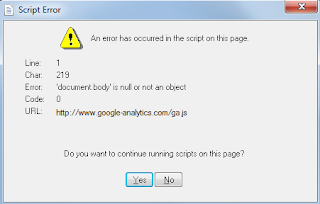
        [Fixed] An Error Has Occurred In The Script On This Page

        It's really common to come across script errors while surfing on the Internet or having fun with some windows apps. Many of us has faced errors related to script throughout our life. One such type of error which says that "an error has occurred in the script on this page; Do you want to continue running scripts on this page?" is seen often by the users. I got one mail from one of my reader regarding this error. This month also I have received several mails with the same problem. Now you can see that many users are facing this error. 
        an-error-has-occurred-in-the-script-on-this-page

        One of my friend told me that he faces this issue whenever he tries to open V7N forums. Along with his laptop started working slowly.

        According to the mails I received people say that they come across this error when they are using any browser such as Google Chrome, Mozilla Firefox or some media player. Frankly speaking this error will arise in almost all the apps. As this arises because of improper scripting or coding error. You can come across this issue in each and every app which is connected to the Internet. 

        Why I Am Facing This Error?

        There can be several reasons for this but I have listed some most common one. I hope you may find your reasons from the listed ones.
        • Due to improper scripting on the web pages.
        • Hypertext template (.htt) files are damaged.

        How To Fix An Error Has Occurred In The Script On This Page

        Here I am going to list three methods to solve this error. Start from the first solution. If your error is not fixed then go for the second solution.

        Method 1:-
        In this method we'll clear all the temporary files to fix this error.
        • Press Window key+R to open Run.
        • Now type %temp% to open temporary folder.
        • Select all the files and delete them. Restart your system.
        • Hope you will not face this error in future.
        If your problem is not resolved through first method then navigate to the second method.

        Method 2:-
        If you're facing this error in Internet explorer then follow this method.
        • Navigate to the top right corner in your Internet explorer and select "Tools"(Setting Button).
        • Then select "Internet Options" from there.
        • Now navigate to the Advanced Tab.
        • Check the following two boxes if they are unchecked; 1. Disable Script Debugging (Internet Explorer) 2. Disable Script Debugging (Other).
        • Now uncheck “Display a notification about every script error”.
        Method 3:-
        • Open Run by pressing Windows Key+R.
        • Now type "Regsvr32 urlmon.dll" and then hit enter.
        • You will see a message saying "DllRegisterServer in urlmon.dll succeeded" , just click OK. You're done.
        So this was all about how to fix an error has occurred in the script on this page. All the methods listed above are the proven ones. You will surely be able to fix this error with one of them. If you have any doubt or query then feel free to leave a comment below in the comment section.

        martes, 21 de abril de 2015

        6 Myths about HTTPS/SSL Ceartificates Should Be Debunked

        If you are associated with web developing in any way then this question "What is SSL Certificate and Why should I use it?" will surely arise in your mind. SSL (Secure Sockets Layer) certificate works as a protection shield for your website. As Internet is the largest source of information so it is essential that your information and important documents should travel with complete security over the Internet. This security of information is determined by SSL certificate. SSL certificates involve encryption and decryption process. Your information is encrypted using the SSL technology further it is sent to the server. If someone wants to read your information then he or she would need a proper decryption key for that.
        Myths-about-HTTPS-SSL-Ceartificates-Should-Be-Debunked

        Need OF SSL Certificate among Online Business

        The main purpose of SSL certificate is to create a trustable environment among the online business for the users so that they can transfer their information & make purchases safely. Now a day’s people always looks for a lock icon or green bar before the URL of the e commerce websites as they want complete security while making a purchase online. That green bar insures user that this e commerce site is completely secured and he or she can make a payment for them without any criminal or hacking activity.
        But as you know that a little knowledge is a dangerous thing. Wrong or incomplete information creates several myths regarding the information. So no doubt there are several myths available in the market regarding HTTPs/SSL Certificates that should be debunked. I have mentioned some of them below so that wrong or incomplete information is not shared among the users.


        1. SSL Certificate Are So Expensive

        This is one of the most spread myths among the users. Whenever it comes to purchasing of SSL certificate the first thing that strikes in the user's mind is cost. They think that we can't afford SSL certificate for our website. This all is because of lack of knowledge. If you will search over the Internet then you will find thousands of free SSL certificates provider. ClickSSL authorized SSL Certificate distributer provides major SSL Certificate brands like Symantec, Thawte, GeoTrust & RapidSSL at very low price in market.


        2. No Effect on SEO at All

        Well if you believe in this myth then I'm sorry to say but you're wrong completely. You might don't know but Google have announced officially that HTTPs is now a ranking factor for your website. HTTPs enabled sites will rank higher in search engines other than sites not having SSL certificate. So SSL certificates can't harm your SEO in any way but it will definitely improve your rankings.

        Must Read :-
        Ultimate Pack Of 10 Tips To Improve Your Internet Security


        3. Extremely Difficult To Manage

        Now a day’s everything works on GUI interface. You just need to learn it first then it's a child play to install SSL certificates. At first it may look a little difficult task to install SSL certificate on your website but when you have done it for one time then you can easily import and generate private, public keys. Whenever you change your IP address or hosting server it will invalidate your certificate but you can re-issue it again by visiting the authority site again. So managing SSL Certificate is extremely easy for users. 


        4. SSL Certificate Will Prevent Hacking

        SSL Certificate will not be able to prevent your website from hackers. If someone says that I am using HTTPs connection on my website and it is impossible to hack my website then sorry to say but this is not the truth my friend. SSL certificate only prevents your user’s traffic from being intercepted by third parties. It is not going to save your website from being hacked. Only the data or information which is sent over the network is protected from the criminals or hackers. Any middle-man can’t intercept traffic which is sent between client and server.


        5. HTTPs Site Response Is Very Slow

        HTTPs is not going to make your site faster in any way but using some good tricks you can make it. Some users have claimed that when they installed SSL certificate on their site their site became slow. It can be possible sometime as encryption process can take some time to encrypt your information. But you can make SSL fast by some tips such as Use keep-alive connections, Use Persistent Caching for Static Content or use network sniffer tool. 


        6. HTTPs for Only Login Page

        This is also one of the most common issues. People say that HTTPs is needed only when we are trying to login on the website or in simple language on home page only. But your work doesn't finish after logging onto the website such as Facebook, Twitter. You can share vital information with someone there at that time your data is not encrypted then hacker can see it easily. You might don't know but public Wi-Fi is a great source of hacking as hackers can see all the traffic easily because it is not encrypted. Even some content based website may also install SSL Certificates just to protect their content to their users.

        Conclusion:
        So this was all about some most common myths related to HTTPs or SSL Certificates. You have read the complete guide now you can understand that all those myths should surely debunked as they mean nothing in the tech world. If you have any query or doubt then feels free to leave a comment below in the comment section.

        martes, 10 de marzo de 2015

        {Genuine} AVG 2015 Removal/Uninstaller Tool For Free

        As we know that AVG is one of the most trustable antivirus available on the internet. It is used to remove any type of virus, spyware or malware. But I have seen that some users are not able to uninstall or remove AVG antivirus from control panel on their system while some time it causes error while uninstalling AVG antivirus. So in this guide you will uninstall AVG antivirus Free 2015 with the use of AVG Antivirus Removal Tool 2015. AVG Removal Tool is officially launched by the AVG technologies for the users who are not able to uninstall AVG antivirus properly. 
        Genuine-AVG-2015-Removal-Uninstaller-Tool-Free

        How To Uninstall/Remove AVG Antivirus By Traditional Way

        If you are not able to uninstall AVG antivirus through traditional way that is using Control Panel then follow the step by step guide.
        • Press Window Key+R or open Run and type "Control Panel" in the text field, hit enter.
        • This will open Control panel on your system.
        • Just navigate to this path now Control Panel >> Programs >> Programs and Features.
        • It will show a complete list of installed softwares on your system, search for AVG 2015.
        • Select AVG 2015 and then click on Uninstall/Change button. Now a dialog box will open which will give you some options such as Update AVG, Uninstall AVG
        • Click on Uninstall AVG, Next, select "Remove user settings" (don’t do this if you’re planning for a reinstall) and "Remove Virus Vault contents" and click ‘Next’ button.
        • Now just restart your system to make the changes appear.
        Now if the un-installation process fails or shows an error then it's time to remove it with the official AVG removal tool 2015.

        How To Remove/Uninstall AVG Antivirus With AVG Removal Tool

        This tool is officially available on the AVG's website so that people don't face any inconvenience regarding un-installation of AVG antivirus 2015. AVG uninstallation tool will remove following AVG products:
        • AVG Antivirus Free 2015
        • AVG Antivirus 2015
        • AVG Internet Security 2015
        First of all you will need to download AVG Removal Tool. Download It from below link :

        AVG Remover 2015 (32 bit) :- Click Here
        AVG Remover 2015 (64 bit) :- Click Here

        Now just install this tool on your system and follow the step by step process to remove AVG 2015 antivirus from your system. Both are verified & official tools from AVG technologies so you don't need to think about any type of virus or malware problem. It will remove AVG user settings, virus vault contents, and other files related to AVG installation. If you have any doubt or query then feel free to leave a comment in the comment section below.

        viernes, 6 de marzo de 2015

        Download Time Stopper Software - Stop Trial Period Of Softwares

        Time Stopper is a tiny utility which eliminate the time limit existing into trial software usage period. Time Stopper Software works with any software executable file and practically will extend the trial period of the program for an unlimited amount of time.

        Download-Time-Stopper-Software-Stop-Trial-Period-Of-Softwares
        Time Stopper is very easy to install and use: you just have to browse for the executable file of trial program (generally located in C:Program Files) and select the new installation date. Now, your program trial period will be automatically extended to another 30 / 90 days, depending on the software.

        Time Stopper will not modify the time and date of the operating system, therefore is safe to use. Using Time stopper you can use trial version software without expiring. If you don't have enough trial period of any trial version software you can extend the trial period using Time Stopper (Source : Time Stopper).


        Note :- This software is only for educational purposes and please do support the software authors to purchasing the software which you really want. Time Stopper is not for all trial versions of the world. According to the brother soft and cnet Time Stopper had been listed under best 50 utility software of the world.

        System Requirements For Time Stopper

        In order to use Time Stopper, you must have one of the following operating systems installed on your computer:
        • 64 MB Of RAM
        • 1 MB Of Free Disk Space
        • Microsoft Windows NT/2000/XP/2003/Vista/7

        How To Download And Use Time Stopper Software


        • First of all download Time Stopper software from below links according to the browser your are using. 

        Mozilla Firefox :  Click Here To Download
        Google Chrome :  Click Here To Download
        Internet Explorer : Click Here To Download
        Opera                   : Click Here To Download
        Safari                   : Click Here To Download 
        • Now extract the Time_Stopper_Setup.rar on your system.
        • If you don't have any .rar file extractor then download it from here.
        • Install now and open it to use on your computer or system.
        • Browser for the .exe file of the software, you can find it in your C drive easily.
        • Now just choose a date say your trial period is expiring today then just choose a date of after two days and create a shortcut on the desktop.
        • That's it, whenever you want to use your program just launch your shortcut.

        So it was all about time stopper software which is used to stop trial period of softwares. Use this software only for educational purposes. If you have any query of doubt then feel free to leave a comment below in the comment section.
         

        lunes, 2 de marzo de 2015

        [Solved] Fix Building Font Cache Error In VLC Media Player

        VLC is a free and open source cross-platform multimedia player and framework that plays most multimedia files as well as DVDs, Audio CDs, VCDs, and various streaming protocols. It's one of the most popular media player available on the internet. It's simple, fast and one of the powerful media player. It plays almost everything such as MPEG-2, DivX, H.264, MKV, WebM, WMV, MP3 and many more. You can download and use it on any platform like Windows, Linux, Mac OS X, Unix, so overall it's an freeware with no spyware, no ads and no user tracking. 
        Fix-Building-Font-Cache-Error-VLC-Media-Player
        In-spite of this VLC media player can also convert one media file into other media also file also. And if you want to stream any movie in your VLC player then you can do it easily without any issue. But as we know nothing is perfect, while using VLC media player some users face an issue that is "Building Font Cache Error" while trying to play any media file. It's a little frustrating issue as it takes a lot of time in building vlc font cache also sometime it can hang your VLC media player also. But don't to worry you can get rid from vlc building font cache error in just few clicks. Just follow the steps given below carefully in order to fix this error.


        Why I Am Facing Building Font Cache Error In VLC ?

        Most of users face this issue when they install VLC media player on their system for the first time. It happens almost every time when you first play VLC player with any file after its installation. While sometime this pop up is shown even after playing many files. The main reason is that VLC rebuilds font cache to show subtitles for your files which are shown at the bottom of file's screen while playing it. While some time you can face this issue due to old version of your VLC media player. So always be sure that your VLC media player is updated to latest version.


        How To Fix VLC Building Font Cache Error

        • Open your VLC media player.
        • Now go to Tools >> Preferences. You can use shortcut key Ctrl+P also in order to open Preferences.
        • A new window will open, at the left side in the bottom you will see "Show Settings" with two options that is Simple and All.
        • Switch from Simple Setting to All Setting.
        • Now navigate to Video >> Subtitles/OSD and change the “Text rendering module” to “Dummy font rendering function”.
        Fix-Building-Font-Cache-Error-VLC
        • Just click on Save button to make changes and restart your VLC media player and that's it. You will not face this problem again.
        Must Read :-
        igfxpers.exe What It Is And How To Disable It
        Earn/Make Money By Downloading Apps With TapCash 
        How To Change/Refresh Facebook Home Page Login Screen 

        So this was all about how to solve/fix building font cache error in VLC media player. If you have any doubt, query or another working method then feel free to mention it below in the comment section.

        domingo, 1 de marzo de 2015

        igfxpers.exe What It Is And How To Disable It

         You might have noticed igfxpers.exe process running in the task manager. It's a little bit difficult task to understand which program it belongs to. Don't take tension it's not a virus, malware or spyware. Igfxpers.exe is a process that provides configuration options for Nvidia graphics cards. It's neither a virus file nor a system file. This process is from Intel, when you install Nvidia Graphic card or any other Graphic card then at that time this process is installed. It's not an essential window process so you can disable it to save your memory and to stop annoying pop up messages. 
        igfxpers-exe-What-It-Is-And-How-To-Disable-It
        Keep in mind that disabling this process may prevent the Nvidia graphics card from working properly. But if you want to increase booting time of your computer then just disable it. 

        Its function includes enabling display resolution settings to persist when a monitor is disconnected or turned off; without it, according to Intel, the display would lose its resolution every time it was turned off. Intel says it is critical to proper running of the display driver as a whole and should not be shut off (Source : Neuber). 


        How To Disable igfxpers.exe Process

        As I told above that this process is not a virus or malware, you're completely safe from it. But still if you think that this process is consuming or eating system resources then you can easily disable it. 
        • Press Window Key+R to open Run, now type msconfig in the text field and hit enter.
        • Now move to Startup Tab and then uncheck "Intel common User Interface and click on Apply to save changes.
        • And that's it, you will no longer see this process in your task manager.
        So this was all about how to disable igfxpers.exe process in task manager. If yo have any query or doubt then feel free to leave a comment below in the comment section.

        martes, 24 de febrero de 2015

        [Solved] Fix Hotspot Shield Not Working/Connecting Problem

         You might be aware about Hotspot shield as you have landed on this article to fix hotspot shield not working problem. Hotspot shield is one of the best rated VPN(Virtual Private Network) software to secure your online presence. It allows you to surf anonymously, unblock any website and hide your online presence. You can use it for your internet safety and privacy. This will secure your browsing, Wi-Fi hotspots, apps, your identity and your IP address to stop unwanted tracking. You can easily unblock any content and service or some social media websites such as Facebook, Skype, YouTube, Flickr and other sites not available in certain countries. 
        Fix-Hotspot-Shield-Not-Working-Problem
        Also Hotspot Shield Compression saves bandwidth and thus speeds up your browsing speed. It also saves your internet data up to a large extent. 

        However on some system people are not able to install it properly due to some reasons. So to solve your problem I have mentioned the reason which causes this error to occur and ways to fix it.

        Why I Am Having Hotspot Shield Not Working Error ?

        There can be several reasons which causes this error to occur but I have mentioned some most common's one here : 
        • You might be having two or more VPN software installed on your system. At that time all these virtual private networks tries to configure their settings according to them but one or more VPN fails to set up its setting on your system. At that time this error is shown up.
        • You might be having a firewall which is not allowing Hotspot Shield to access traffic. Always be sure that your firewall is allowing HSS to access internet and traffic.
        • Sometime your antivirus software doesn't allow HSS to access traffic then HSS will show this error. Always be sure that your antivirus is allowing hotspot shield to access internet.
        These are some of the most common reasons which you can check before going to the below mentioned tip to solve hotspot shield not working problem.

        How To Fix Hotspot Shield Not Working Problem

        This is a simple tip which you can use in order to run your HSS properly.
        • First of all download and install Hotspot Shield on your system and then it will open Hotspot Shield website in your browser, just copy the address from the address bar and save in anywhere on your system say Notepad.
        • Now if your having problem in connecting then just navigate to this path : Control Panel > Network Settings > LAN (Local Area Connection) > Properties
        • Now in the General tab you will see an option, "Hotspot Shield Helper Driver", just uncheck the box in-front of it and save the settings.
        • Now open your internet browser again and paste the address that you copied and hit enter.
        • Just try to connect your HSS again, hope it will start working.
        So this was all about how to solve hotspot shield doesn't work problem. If you are still not able to connect it, then feel free to leave a comment below.