Mostrando entradas con la etiqueta Alexa. Mostrar todas las entradas

viernes, 12 de junio de 2015

How To Know Alexa Rank Of A Particular Country

Alexa is an Amazon product. It's a amazon web company which allows you to check your website's global ranking and country specific ranking. Alexa shows the ranking of each and every website which comes under 20,000,000. It shows your website's ranking after measuring a lots of factors such as page views, traffic, keywords ranking and much more. You might have observed that Alexa doesn't start showing ranking until your site has gained enough web traffic. 
check-alexa-rank-specific-particular-country

Alexa is the only website which tell that where your website stands globally. At the initial stage it only updates your global ranking but once you started gaining enough traffic from other countries then it will update your rank for each and every country. In one of my previous article I covered some seo factors which can affect your global ranking.

If you want to know your website's rank then simply do a search on Alexa and then it will show your all over world ranking and ranking in a specific country for example say your website is from India then it will show global ranking along with rank in India. If your website fall under 100,000 then Alexa will show ranking of other countries too. It can update a maximum of 30 countries ranking. But what if you want to know your site's Alexa ranking for other than these 30 countries? My friend you can't get it on any other website or by directly searching on Alexa search.

Relax and site back, Here's a trick to find out Alexa ranking for particular each and every country. Follow the steps mentioned below in order to find Alexa rank for specific country.

How To Check Alexa Rank For Particular Country

1. Sign Up For A Account
First of all you sign up for a new account on Alexa. Click on "Sign Up" button on the top right corner. Choose any paid service or go for a free account. You can get 7 days free trial from Alexa. Choose free trial service if you don't wanna pay at starting.

2. Ownership Verification
This is the second step which is must to appear your Alexa ranking for the first time. Just upload the HTML file to your website's root directory and add Alexa meta tag to the header of your site. Once your ownership is verified you are free to add description of you website and all other details. Alexa lets you put 2 links also just below your description but for this you need to choose a upgrade plan.

3. Check Country Specific Rank
Once you have saved your profile, you have completed 75% of the work. Your ranking stats would appear in 2-3 days. At initial stage you can see only global ranking of your website. To see particular country Alexa rank follow the below mentioned steps:-
  • Login into your Alexa account.
  • Click on My Dashboard.
  • Choose your website and navigate to Site Management>>edit Site Listing.
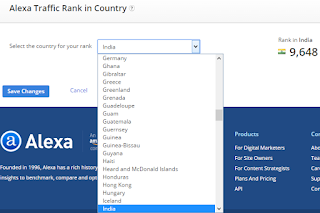
  • Scroll to the end of the page now here you will see Alexa Traffic Rank In Country.
  • Here is a list of over 200 countries to choose from drop down menu. Go and check out your website ranking for some countries and start increasing your Alexa ranking.
So this was all about how to check your website rank for particular country. To get benefit of this feature you need to sign up on Alexa as according to terms & conditions this ranking checking factor is not available publicly. If you have any doubt or query then feel free to leave a comment below in the comment section.

jueves, 17 de julio de 2014

10 Methods To Increase Alexa Ranking Of Your Blog/Website

With the improvement in technology day by day businesses have taken up online marketing. People now prefer to advertise through fastest growing technology internet. One of the best method of online marketing is creating a website and publish your content on it. Now there are different ways of attracting traffic like link building; you will need to link your website with high quality post and many more ways. Then the question arises in mind that how I will come to know about how much traffic I am getting ? Is it increasing or not? the answer to all these questions is Alexa. 
Increase Alexa Rank
Increase Alexa Rank

What Is Alexa.com?
It is a website monetization strategy which ranks your website according to the traffic you are getting. 

What Is Alexa Ranking And How it Works?
This is a ranking system set by alexa.com (An Amazon's Product) that basically audits and makes public the frequency of visits on various websites. The process through which Alexa traffic rank is calculated, is simple. it is based on the amount of traffic recorded by the users who have installed Alexa toolbar over a period of three months. In simple terms, Alexa traffic rank is a rough measure of a website's popularity, compared with all the other available on the internet. 

Is Alexa Ranking Worth Anything?
After Google's PageRank, Alexa can be a competitive tool to measure a site's popularity. If your Alexa rank is increasing , then you are getting traffic from bloggers which will help you a lot in boosting  your earnings. As you now know your rank will increase with this factor; how many users have installed Alexa toolbar and have visited your blog/website. But not everybody has the installed Alexa toolbar so there might be chance that your site may not be ranked higher. 

How To Increase Alexa Ranking? 
If you want to increase your Alexa ranking then just have to follow these simple tips listed here :

10 Methods To Increase Alexa Rank

1. Claim Your Blog/Website :-
To gain full control over your site, just claim it on alexa.com. So others will know about who owns it and also about the site description. It will help you a lot in ranking your blog/website higher. You can simply register on alexa.com and your first month will be free of cost then you can apply for any of the upgrade plan available.

2. Install Alexa Toolbar :-
Install alexa toolbar on your browser and also ask your friends, visitors to install on their browser.

Read Also :- How To Use Keyword Planner - Keyword Tool From Google Adwords

3. Put Alexa Widget On Your Blog :-
Add alexa widget on your blog, it will help your blog/website higher. The reason of putting Alexa widget on your blog is that whenever users having installed Alexa toolbar on their browser will visit your blog, Alexa will know about it and it will increase your blog/website ranking to a large extent.

4. Write Quality Post :-
Useful and high quality post will help you a lot to increase your Alexa ranking. Write only those posts which have high search volume and also content should be unique. Don't ever try to think about copying any content from somewhere. This is not going to help you in any way because Google will not index it or by chance if it will be indexed then your post will never rank higher in search engine.  

Write some post about webmaster related and share it on webmaster forums and social networking websites to get a decent amount of traffic.

5. Write A Review About Alexa On your Blog/Website :-
Write some good quality posts about and then link it back to alexa.com. It will help you to gain trust of Alexa. Whenever you will get visitors on that posts, your alexa linking will help you a lot to rank higher.

6. Update Your Blog/Website Regularly :-
One of the best method to increase your ranking is, regularly update your blog. Plan a schedule about post writing and just go with that. It is strongly recommended to write frequently to increase your alexa rank otherwise it will go down and it becomes very hard to bring back your alexa again. 

7. Link Building :-
Comment on other blogs which are under the niche Blogging and Technology with good traffic and link back to your blog. In this way build more links from blogs with good traffic because backlinks are crucial as you might have noticed that alexa even calculates the number of backlinks you have.

8. Use Social Network :-
Try to get your post on social networking websites like digg.com, stumbleupon.com.

9. Optimize Your Blog/Website :-
Optimize your blog/website for alexa related keyword. It will increase linking of alexa.com in your blog. 

10. Use Alexa Redirect :-
This means placing http://redirect.alexa.com/redirect? in front of your Web site's URL. Thus, Alexa will even take into consideration clicks on redirected links even if the visitor does not have the Alexa toolbar.